

Description
Download Drawchemy abstract drawing APK – abstract drawing, Android tablet, free, open-source, creative tool
Overview
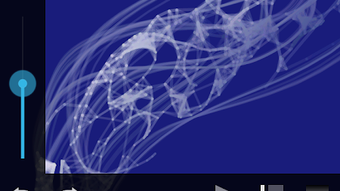
Drawchemy is a free and open-source abstract drawing application designed specifically for Android tablets. It serves as a digital canvas for users seeking expressive, spontaneous creativity through minimalistic yet powerful tools. The app enables users to generate vibrant, dynamic abstract compositions using intuitive gestures and a selection of customizable brushes. It is particularly suited for artists, designers, and hobbyists who value experimentation and visual exploration over precise technical rendering.
Drawchemy addresses the need for accessible, lightweight creative tools that support immediate artistic expression without the complexity of full-featured digital painting software. It is ideal for quick ideation sessions, mood board creation, or generating initial concepts for more detailed work in other applications. The app’s focus on abstraction allows users to explore color, form, and motion without the constraints of representational accuracy.
Developed by PPatrick, Drawchemy is inspired by the desktop application Alchemy, though it functions as a standalone tool tailored to mobile touch interfaces. The app is released under the GPLv3 license, ensuring transparency and community-driven development. Users are encouraged to contribute to its source code on GitHub and share their creations via the official Tumblr page, fostering a collaborative creative ecosystem.
Key Features & Capabilities
- Abstract Drawing Tools: Offers a suite of brushes optimized for touch input, enabling fluid, expressive strokes ideal for non-representational art.
- Color and Opacity Control: Provides a color picker with adjustable opacity, allowing users to layer colors and create depth through transparency effects.
- Visual Effects: Includes mirror, gradient, and random hue effects to transform simple strokes into complex, visually engaging compositions.
- Canvas Manipulation: Supports zoom and pan functionality, enabling detailed work and dynamic exploration of the drawing space.
- Background Image Import: Allows users to load images as canvas backgrounds, providing a reference or base layer for abstract reinterpretation.
- Export and Sharing: Drawings can be saved in PNG format and shared directly with others via standard Android sharing methods.
These features empower users to turn simple gestures into rich visual experiences. For example, a user might apply a mirror effect to a single stroke to generate symmetrical patterns, or overlay a gradient across a series of random lines to produce a dynamic color field. The ability to use background images makes Drawchemy useful for remixing existing visuals or creating layered abstract works.
User Interface, Workflow & Performance
The user interface of Drawchemy is designed with simplicity and touch efficiency in mind. The main canvas occupies the central area of the screen, with tool controls positioned along the edges for easy access with one hand. Navigation is intuitive, relying on touch gestures such as pinch-to-zoom and swipe-to-pan, which align with standard Android interaction patterns.
Workflow is streamlined to support rapid creation. Users can begin drawing immediately after launching the app, with no lengthy setup or configuration required. The minimal interface reduces cognitive load, allowing focus on the creative process. While specific performance metrics were not provided, the app’s lightweight nature and focus on abstract drawing suggest efficient resource usage, particularly on modern Android tablets.
Stability and responsiveness are expected to be consistent given the app’s open-source development model and community oversight. The developer did not specify resource usage details, but the absence of heavy processing features implies low CPU and RAM consumption during typical use.
Compatibility & System Requirements
Drawchemy is designed for Android tablets and is compatible with devices running Android 6.0 (Marshmallow) or later. The app’s installation size is not specified, but its lightweight nature suggests minimal storage requirements. The developer did not provide additional system requirements, so users should ensure their device supports touch input and has sufficient memory for image rendering.
Platform compatibility information is limited to Android tablets. There is no indication of support for smartphones, desktops, or other operating systems. The app was released on May 14, 2024, and is available as an APK file for direct download.
Pros and Cons
Pros
- Free and open-source under GPLv3, allowing full transparency and community contributions.
- Optimized for Android tablets with intuitive touch-based interface.
- Offers powerful visual effects like mirror, gradient, and random hue for creative exploration.
- Supports background image import for layered abstract work.
- Simple, distraction-free interface promotes immediate creativity.
- Drawings can be exported in PNG format and shared easily.
Cons
- Limited to Android tablets; no support for other platforms.
- Exact system requirements and file size were not specified.
- Lacks advanced features like undo/redo history or layer management.
- No built-in cloud sync or project saving beyond local storage.
- Dependent on user device’s touch screen quality and responsiveness.
FAQ Section
Is Drawchemy available for iOS devices?
Drawchemy is currently designed for Android tablets and is not available for iOS devices. There is no official release or plan for iOS support as of the 2024-05-14 release.
Can I use Drawchemy offline?
Yes, Drawchemy does not require an internet connection to function. All drawing, editing, and saving operations occur locally on the device.
Is Drawchemy safe to download?
Drawchemy is open-source and available via official channels. The APK file is hosted on the developer’s GitHub repository, which enhances transparency. Users should only download from trusted sources to ensure authenticity.
How do I update Drawchemy?
Updates are released through the developer’s GitHub repository. Users can check for new versions manually and reinstall the latest APK file when available.
What license does Drawchemy use?
Drawchemy is licensed under the GNU General Public License v3.0 (GPLv3), which allows free use, modification, and redistribution of the software, provided that derivative works are also open-source.
Final Thoughts
Drawchemy delivers a focused, accessible experience for users interested in abstract digital art creation. Its minimalist design, combined with powerful visual effects and a responsive touch interface, makes it a compelling choice for casual artists and creative explorers on Android tablets. While it lacks advanced features like layers or cloud storage, its strengths lie in simplicity, speed, and creative freedom.
For those seeking a lightweight, open-source tool to experiment with color, symmetry, and form, Drawchemy offers a refreshing alternative to complex digital painting software. The app’s open development model and active community engagement further enhance its value.
Download Drawchemy now
Guides & Tutorials for Drawchemy abstract drawing APK
How to install Drawchemy abstract drawing APK
- Click the Preview / Download button above.
- Once redirected, accept the terms and click Install.
- Wait for the Drawchemy abstract drawing APK download to finish on your device.
How to use Drawchemy abstract drawing APK
This software is primarily used for its core features described above. Open the app after installation to explore its capabilities.
User Reviews for Drawchemy abstract drawing APK 0
No reviews found





